Robucai: A Friendly, Modern Display Font for Small Business Branding
It started with a stack of blank candle labels on my kitchen table—just me, a printer, and the growing realization that my “handwritten charm” wasn’t translating well to shelf appeal. My small-batch soy candles had lovely scents and thoughtful packaging, but the fonts I’d been using felt inconsistent: one label in a bubbly script, another in a generic sans serif, a third in something too thin to read from across the room. Customers loved the products—but I kept noticing how often they paused, squinted, or asked, “What’s this one called again?” That tiny hesitation? It wasn’t just about legibility. It was about trust. Clarity. Confidence.
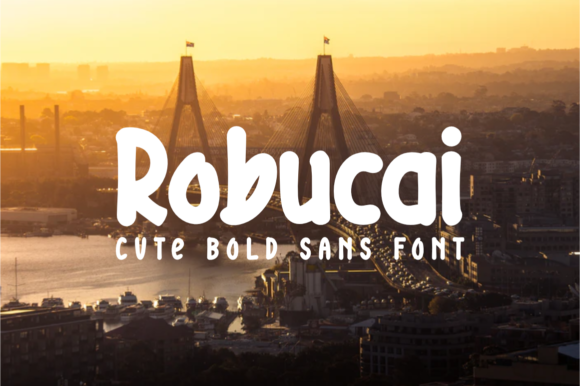
That’s when I found Robucai: a free display font that’s equal parts playful and polished. Not flashy, not fussy—just thick, clean letterforms with subtle techno-inspired angles and a cheerful, grounded presence. Think minimalist design meets friendly personality. It’s the kind of typeface that says, “I care about how things look—and I mean business,” without ever sounding corporate or cold.
Robucai isn’t built for paragraphs or body text. It shines where you need impact: logos, product names, packaging headers, café menu titles, sticker accents, social media banners, and website hero text. Its bold weight and open spacing make it highly readable—even at small sizes on printed labels or thumbnail-sized Instagram posts. On a matte black candle jar label? Robucai’s crisp contrast pops beautifully. On a pastel bakery box? It adds just enough structure without overpowering the warmth.
I tested it across real touchpoints: a new batch of thank-you cards (printed on textured kraft paper), a refreshed set of Instagram Story templates, and even the header on my simple Shopify homepage. Every time, the result felt more intentional—like the brand had quietly grown up. Not because I changed my voice or values, but because Robucai gave my words visual consistency. When your logo, your Instagram bio, your product tag, and your email subject line all share the same confident, friendly rhythm, customers start recognizing you faster—and remembering you longer.
Typography is often the quietest part of branding—and the most powerful. First impressions happen in under two seconds, and over 90% of that impression is visual. Robucai helps small businesses communicate competence and care before a single word is read. It’s not about looking “expensive.” It’s about looking considered. When your handmade soap label uses Robucai for the scent name (“Lavender + Oat Milk”) beside a clean sans serif for ingredients, the hierarchy feels natural—not forced. When your boutique’s seasonal sale banner pairs Robucai headlines with a soft serif for fine print, it balances energy with elegance.
For pairing, Robucai plays especially well with neutral sans serifs (think Inter, Poppins, or Montserrat) for supporting text—clean, modern, and highly legible on screens and print. Want warmth? Try it with a gentle, low-contrast serif like Lora or Playfair Display for quotes or short descriptions. Avoid competing scripts or overly decorative fonts; Robucai’s personality is strong enough to hold its own, so let it lead while simpler companions handle the details.
Before downloading any free font—including Robucai—I always check three things: file formats (OTF and TTF are safest for both Mac and Windows), included weights (Robucai is a single-weight display font, which works perfectly for its intended use), and licensing. Good news: Robucai is offered as a freebie, and its license permits commercial use—meaning you can use it on product packaging, client work, digital templates, and even merchandise, no attribution required. Just double-check the source for multilingual support if you plan to use accented characters (it covers basic Latin, including common European diacritics).
Here’s what’s worked for me in practice:
- Packaging & Labels: Used Robucai for candle scent names and bakery box headers—bold enough to stand out against textured paper or matte finishes.
- Social Graphics: Applied it to Instagram carousel titles and Pinterest pin headers—it scales cleanly and stays sharp even when compressed.
- Printed Materials: Printed business cards and mini menus with Robucai for headings; paired with a light sans serif for contact info—no ink bleed, no readability issues.
- Digital Ads: Used it in Facebook ad banners and Google Display Network creatives—its thickness ensures clarity at small sizes and fast-scrolling speeds.
One thing I love about Robucai is how it bridges the gap between “handmade” and “professional.” As a small business owner, I don’t need—or want—a premium font library full of complex options. What I need is one reliable, versatile, joyful display font that makes everyday design decisions easier. Whether I’m updating a sticker for a new candle launch or tweaking the header on my Etsy shop banner, Robucai delivers consistency without compromise.
And because it’s a free font, there’s zero risk in trying it. No trial periods, no watermarks, no hidden fees. Just download, install, and test it on something real: your next label, your next post, your next customer-facing moment. You’ll feel the difference—not in some abstract design sense, but in how people pause, smile, and say, “Oh—that’s yours.”
Typography doesn’t have to be intimidating. With Robucai, it’s simply a smarter, friendlier way to show up—clearly, confidently, and consistently.